Less Time Managing Email Tags, More Time Moving Work Forward: Email Made Easier
Bringing Conversations Together For Shipping
In shipping, there's already plenty to keep track of. Conversations move between teams, vessels, and voyages, and the details that matter need to stay connected along the way. The last thing anyone needs is to spend more time organising the work than actually getting it done.
A vessel's port call generates its own correspondence. A fixture brings new instructions, documents, and commercial discussions. And when a vessel is fixed, the information gathered before the fixture needs to connect with the voyage that follows.
Job tags help bring those conversations together in Sedna Email. But when the way you organise them doesn't quite fit how your teams work, keeping everything consistent can become a job in itself.
At Sedna, we understand the realities of shipping, and we're here to make the work behind it genuinely better, faster, and easier. That means listening to how teams operate and continually improving the tools they rely on, so they can spend less time managing processes and more time focusing on what matters.
Enhanced Job Tag Management gives teams more control over how they organise their work in Sedna. IT admins can define tagging structures that suit their business, while team members can create, update, and merge tags themselves, without needing to raise a request with Sedna Support.
Organise Work Around The Way Your Teams Operate
Different teams need different views of the same business. Operations might organise emails by voyage or port call. Technical teams might need to group messages around individual vessels. Chartering teams might need to connect early fixture discussions with the voyage record once a deal is done.
At Sedna we know that one email tagging structure won't necessarily suit every team. And when business needs change, the way you organise work needs to change with them.
Enhanced Job Tag Management introduces Job Tag Templates. With Job Tag Templates, IT admins can now define the structure behind their team's tags. Your IT admin will be to choose a standard template for voyages, vessels, or broker fixtures, or build a custom template to suit your workflow
Your admin can decide:
- Which information a tag should capture
- Which fields are required
- How the tag name is assembled
- Which teams can access the tag
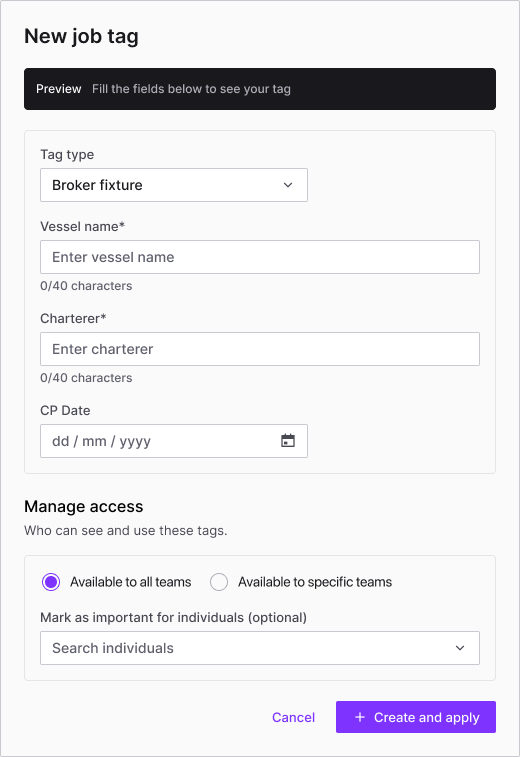
We’ve built this so that you get a more consistent way to organise your emails, built around the needs of your business, rather than a one-size-fits-all approach.
Save Time By Doing It Yourself: Changing Job Tag Structures
A team's tagging requirements aren't necessarily fixed. Your workflows evolve, new information needs to be captured, and your teams may need to organise emails differently as the business grows.
Previously, changes to job tag structures could require a request to Sedna Support. With Enhanced Job Tag Management, IT admins can create and edit templates directly in Sedna.
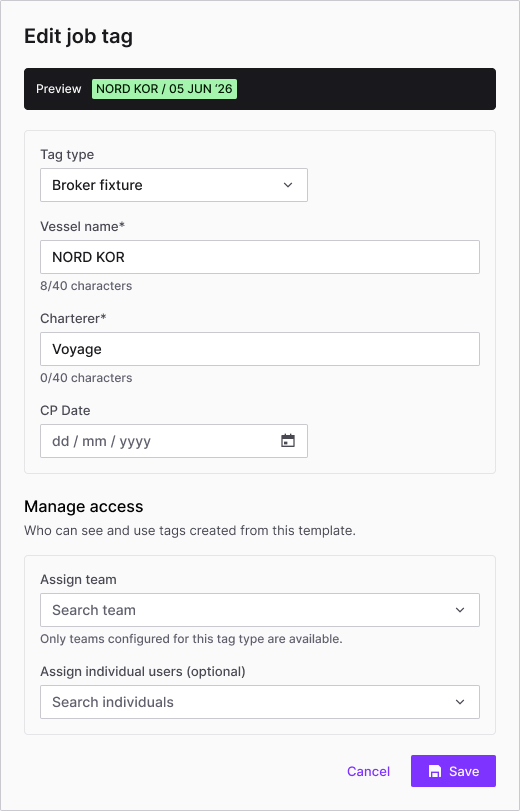
Your IT admins can define the fields they need, set a naming convention, and preview how the finished tag will look before saving it. Templates can also be made available to everyone or restricted to specific users and teams.
For our customers, creating a tag is straightforward. You can select an available template, enter the relevant details, and save it. Sedna generates the tag name automatically, following the agreed format. And because tags can be created directly from the tag panel while viewing a message, you won’t need to break away from the conversation you’re already working on to organise it.
There's also a keyboard shortcut, Shift + J, for creating tags while viewing a message, with a fully keyboard-navigable form for those who prefer to keep their hands on the keys.
It's a small change to the workflow, but one that makes organising emails easier to fit into the working day.
From Fixture To Voyage: Keep The Conversations Connected
Consider a familiar scenario:
Your chartering team has been discussing a potential fixture. The messages are grouped under a pre-fixture tag, keeping the early commercial conversations together.
The vessel is fixed. Now the operations team needs to work with the voyage, and the correspondence needs to sit under the final voyage tag.
Rather than leaving two tags in circulation, you can now merge them.
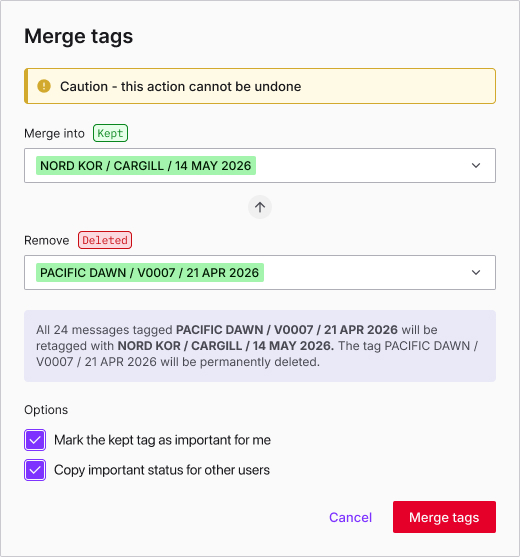
All you need to do is choose the tag to keep as the primary tag and choose the tag to remove as the secondary tag. Sedna applies the primary tag to messages that carried the secondary tag, then permanently deletes the secondary tag.
The result is one tag connecting the relevant messages, rather than two competing labels for the same work. This is particularly useful when a fixture moves from negotiation into execution and the people involved need continuity across the handover.
The same flexibility applies when tags need updating. You can edit them from the message tag panel or through Settings, without having to unnecessarily navigate away from your work.
Consistency Where It Matters, Flexibility Where It's Needed
Giving teams more control over their emails doesn't mean sacrificing consistency.
- Templates give you a shared structure for the information captured in job tags
- Required fields help ensure that important details aren't missed
- Standardised naming conventions make tags easier to recognise and use
This consistency supports more accurate auto-tagging and reporting, helping teams maintain a clearer picture of their work across messages.
At the same time, admins can tailor templates to different workflows and control who can use them. Default team access can be set for each template, with Sedna Email users able to adjust team access on individual tags where permitted by the workflow.
It's a balance between establishing standards that work across the business and giving teams the flexibility to manage the detail of their day-to-day work.
Less Admin Around The Work Itself
Good organisation shouldn't create another layer of work.
Enhanced Job Tag Management puts more of the control in the hands of the people responsible for keeping Sedna Email organised. IT admins can manage templates themselves. Our customers can create and edit tags from where they're already working. And when a fixture becomes a voyage, related correspondence can be brought together through a simple merge.
The bigger benefit is that we’re making it easier for teams to keep their email correspondence organised as shipping work evolves, without unnecessary admin slowing them down.
Because when the next fixture, port call, or voyage needs attention, the focus should be on moving the work forward, not managing the tags around it.
Thinking About What Really Matters
We understand the realities of working in shipping. The competing priorities, the constant flow of information, and the importance of getting the details right.
Our role is to make that work easier, bringing greater clarity to the conversations and information teams rely on, and giving people the confidence to focus on what matters.
Enhanced Job Tag Management is one more way we're doing that: helping you stay organised, keep work connected, and spend less time on administration. You can spend more time making good decisions, keeping voyages moving, and protecting commercial value.
We're here to support the people behind the work, with technology built around the way shipping really operates.
Sedna Help Centre Articles: Further Reading
- For IT Admins: Creating Job Tag Templates
- For End Users: Creating, Editing, & Merging Job Tags