What's New in Sedna This Month: Less Chasing, More Doing
Shipping is built on relationships, quick decisions, and people who know their business inside out. But when information is scattered across email threads, systems, and teams, even experienced people can spend too much of their day tracking things down instead of getting things done.
We understand that shipping businesses all work differently. The pressures on a chartering desk aren't always the same as those facing an operations or IT team. That's why we're continually developing Sedna around the way the industry actually works: bringing information together, making everyday tasks easier, and giving people the tools and context to do their best work.
This month's updates are designed to help you spend less time managing information and more time moving your business forward.
Here's what's new across Sedna VMS, Sedna Pre-Fixture, and Sedna Email:
Sedna VMS: More Context for the Decisions that Shape Your Returns
Which cargo fits an open vessel? How do alternative ports affect the return? What does a changing voyage result mean for each counterparty? This month’s Sedna VMS updates help teams answer these questions with more information together and less repeated work.
Introducing Positions: Fleet Availability and Cargo Commitments in One View
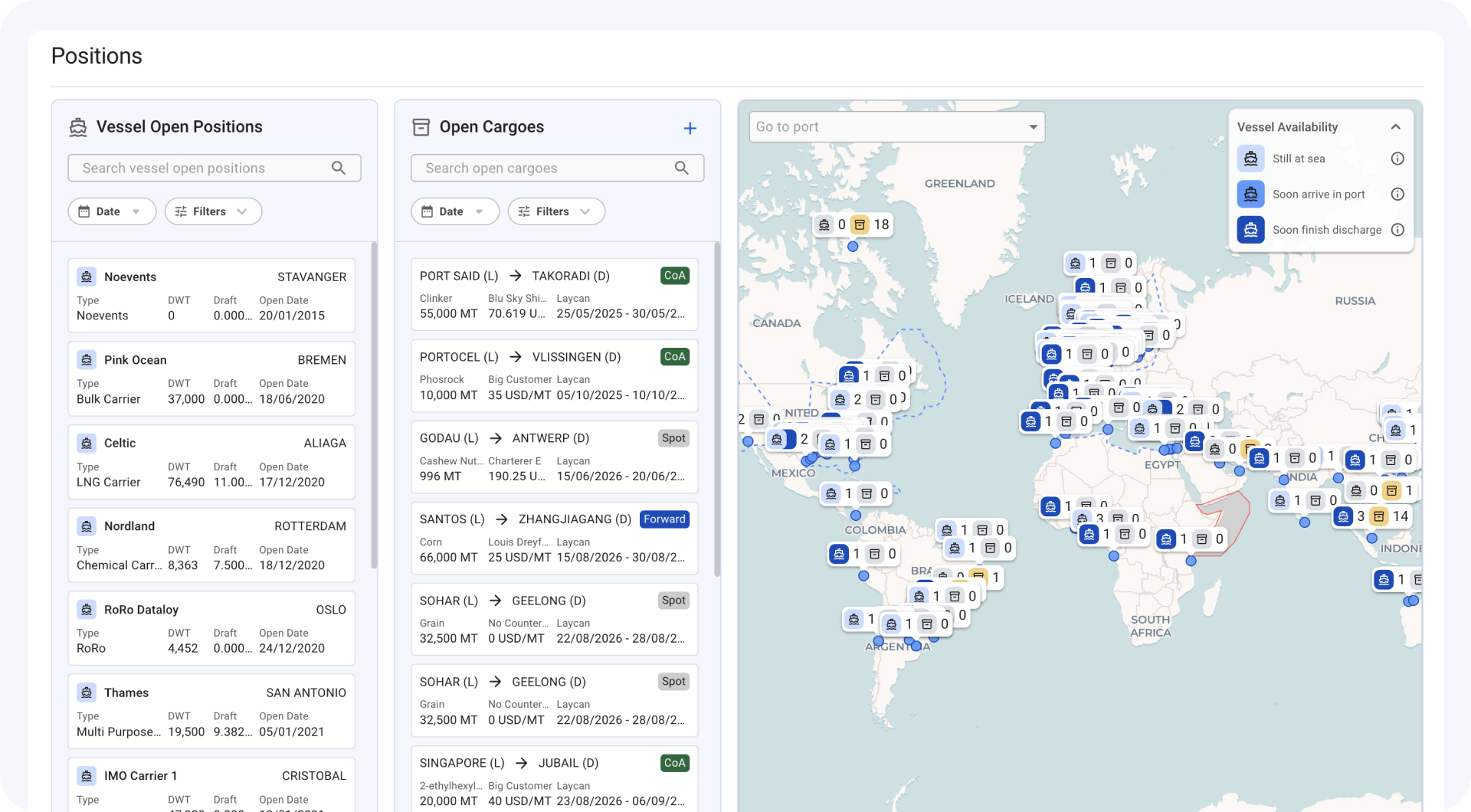
Positions brings vessel and cargo lists together in one chartering workspace in Sedna VMS, alongside an interactive map. Filter by open date, laycan, DWT, commodity, business unit, and trading area, including your company's own areas and zones. Switch vessel and cargo map layers on or off independently, and use the legend to understand the status of each position.
For teams managing Contracts of Affreightment (CoAs), scheduled and spot cargoes appear together, with CoA cargoes retaining their link when used in an estimation. Promote an estimation and the voyage is automatically added to the CoA's Scheduled Voyages tab, helping keep contract quantities accurate. Undeclared optional CoA cargoes are marked with an Optional tag, which clears once they're declared.
When you find a potential match, drag a vessel onto a cargo, a cargo onto a vessel, or use Quick Create to start an estimate. Open a vessel position to see its current estimations, comments, and context from its latest nominated voyage, including remaining bunkers and recently carried cargoes. With the relevant information together, your team can assess opportunities without chasing details across different records.
Optional Ports: Compare the Choices Before You Quote
A cargo may offer a choice of load or discharge ports. One combination could reduce sailing time while another changes port costs or time in port. The commercial difference needs to be understood before quoting.
Optional Load and Discharge Ports lets charterers compare those choices within one estimate. Sedna VMS calculates each valid combination, showing voyage result and time charter equivalent (TCE), or the freight required to achieve a target TCE.
Port costs, loading and discharging rates, and terms can be entered once and applied across alternatives containing that port. Individual scenarios can override shared assumptions where needed, and firm ports from the base voyage can also be treated as optional.
The desk can explore the relevant combinations on a consistent basis, without rebuilding the same assumptions for every scenario.
Combined Estimates: See What Both Employment Periods Contribute
A vessel could complete a voyage charter and then enter a period of time-charter employment. Assessing each separately leaves the charterer with another calculation: does the employment make commercial sense when considered together?
Combined Voyage + TC Out Estimate brings both periods into one assessment. Add a time charter out directly to a voyage charter estimate to see the combined TCE, duration, and result.
The delivery port comes from the voyage’s last port, and redelivery is calculated from the TC days entered. The TC Out remains linked to the voyage charter, avoiding the need to build and reconcile two separate contracts.
Charterers gain a clearer view of the overall employment proposition, including how the time-charter period affects the combined return.
Result Sharing: Keep Each Party’s Allocation Connected to the Result
A sharing agreement can be clear when signed, but the amount due to each counterparty may change as the voyage result develops. Percentage shares, fixed amounts, and limits on gains or losses all need to be reflected consistently.
Result Sharing lets business controllers configure these arrangements directly on individual voyages. It supports multiple counterparties, percentage or lump-sum allocations, minimum and maximum thresholds, and loss-sharing rules.
Sedna VMS calculates each party’s share and reflects it in voyage P&L, reporting, analytics, and snapshots. Shares can then be settled through accounts payable and receivable invoicing.
Commercial and finance teams have a consistent basis for understanding how the agreed terms translate into each party’s allocation, through to settlement.
Hire Payments: Preserve the Adjustments Behind the Schedule
A hire-payment schedule needs to follow the contract. When rates or dates have been adjusted manually, recalculating that schedule should preserve the decisions already made.
Hire-payment improvements give operations teams day-based, monthly, and semi-monthly options through Payment Cycle Automation, with the ability to follow calendar months or specify payment days. Existing rates are preserved during recalculation, and individual rate end dates can be locked to protect manual adjustments.
For accountants planning upcoming payments, Pending Hire Payable shows the next payment period due for each contract. Company and business unit can also be assigned to each time-charter duration for reporting and invoicing.
Operations can maintain schedules around agreed terms, while finance has clearer visibility of upcoming hire periods and where those costs belong.
Recap Email Widget: Bring Voyage Details Straight Into the Message
Preparing a fixture recap means bringing voyage details and commercial figures together accurately. Copying that information into an email adds another task for the desk.
The Recap Email widget creates a prefilled draft in Sedna Email directly from the VMS. Choose Recap Current or Recap as fixed to bring vessel, voyage, charterer, cargo, and port details into a message, alongside commercial figures including rate, TCE, and P&L.
Your team can review and edit the draft before sending, reducing manual copying while keeping control over the information it shares.
Sedna Pre-Fixture: Keep Your Desk Connected and Opportunities In View
For chartering teams and shipbrokers, staying close to the market means keeping track of a constant flow of vessel positions, cargo enquiries, and conversations. An opportunity can move quickly, and knowing who is handling it, what has been discussed, and what needs attention next makes a difference.
Sedna Pre-Fixture helps bring that activity together, giving teams a clearer view of their work and making it easier to stay in step.
Keep the Conversation on the Record:
The new Activity tab gives Tonnage, Cargo, and Vessel Directory records a shared place for comments. Each comment appears in one feed alongside the record, with the name of the person who posted it and a timestamp. That makes it easier to follow discussions, pick up where a colleague left off and keep useful context with the opportunity.
In list views, a comment icon shows which records have activity. You can also sort or filter by Last Activity to find records with recent discussions and see which opportunities are being worked on.
Share the Right Information with the Right People
Chartering desks don't all work in the same way. Shared Workspaces let you organise vessels, cargoes, and opportunities around the work that matters to your team.
New workspaces are private by default, and you can share them with selected colleagues, entire teams, or both. Team access stays up to date automatically, so people who join a team get access and those who leave lose it. Existing public workspaces are becoming private to their creator, ready to be shared again with the people who need them.
You can now share saved searches in the same way: with specific colleagues, one or more teams, or a combination of both. That means you can build a search around a particular trade lane or set of opportunities and make it available to exactly the people who need it. Everyone you share it with can view, edit, and delete the search, while only the creator can change its sharing permissions. Your own searches now appear at the top of the list, with searches shared with you below.
Whether you're managing a busy chartering desk or working with colleagues across different markets, these updates make it easier to keep conversations connected, share useful market views, and stay on top of opportunities.
Sedna Email & Send VMS: Keep Email Connected to the Voyage
Operators shouldn't have to open another system every time they want to check which voyage a message belongs to. With the Job Tag VMS Integration, every voyage in Sedna VMS becomes a job tag in Sedna Email as soon as it's created, and the tag updates whenever the voyage changes. Tags carry the details your team actually uses to identify a voyage, such as charterer, operator, or voyage number, so you can see where an email belongs without opening the VMS.
The integration is rolling out across accounts in stages. Your Customer Success Manager can let you know when yours is scheduled.
Sedna Email: Spend Less Time Managing Your Inbox
Anyone working in shipping knows how quickly a shared inbox can fill up. Position lists, system notifications, and circulars all have their place, but they shouldn't get in the way of the messages that need someone's attention.
Admin Centre: One Place to Add, Update, and Export Users
Take a busy operations desk welcoming three new colleagues. Until now, getting each person set up could mean working across several screens, while bulk changes often required a request to Sedna Support. Admin Centre gives IT Support users one place to add, update, and export Sedna Email users and teams.
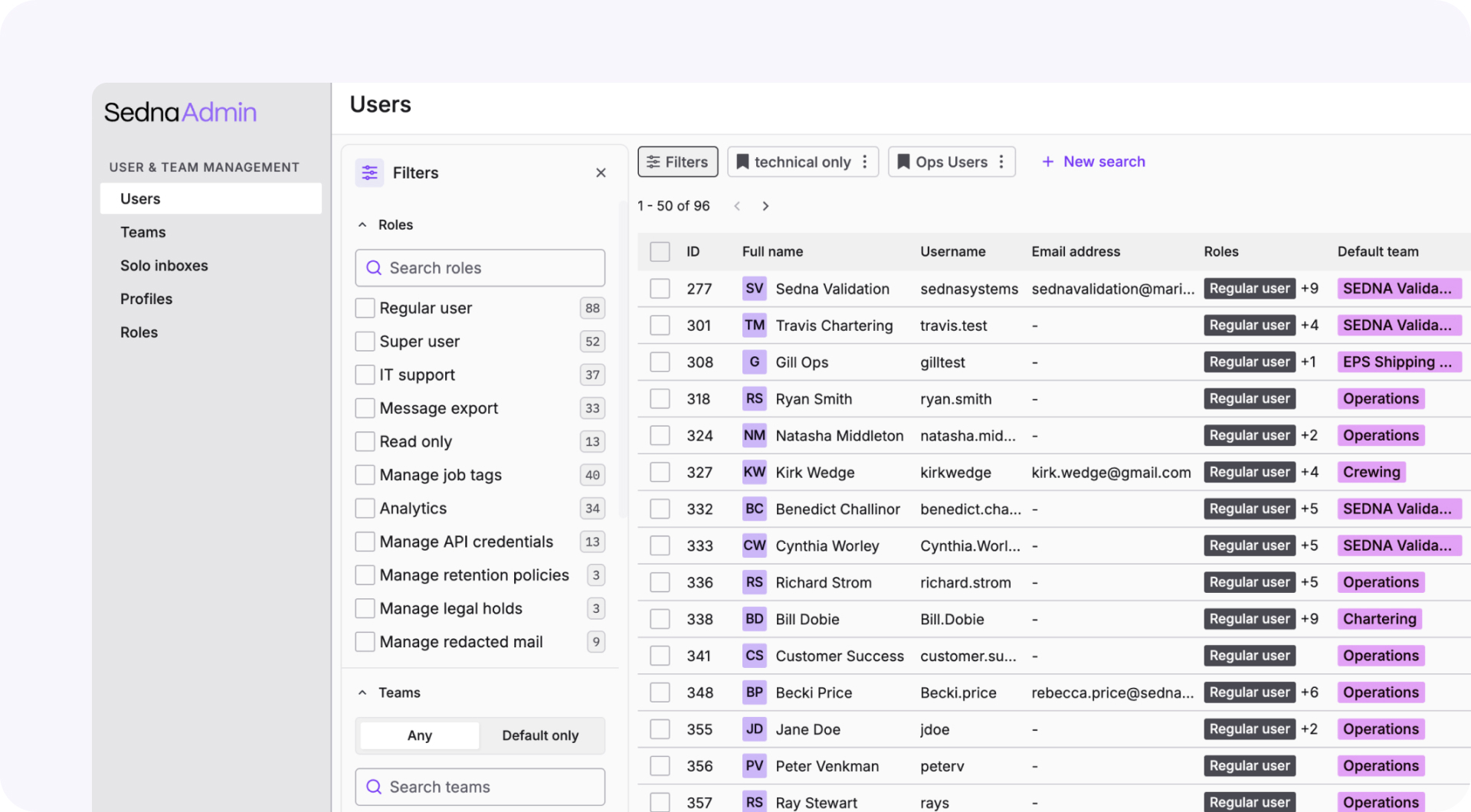
Save a standard setup, such as "Operations London", as a Profile, and a new joiner is ready in one step. You can also import up to 500 users or teams from a CSV file, update up to 50 users at once, and export user and team details for audits. Read about Admin Centre.
Create, Edit, and Merge Job Tags
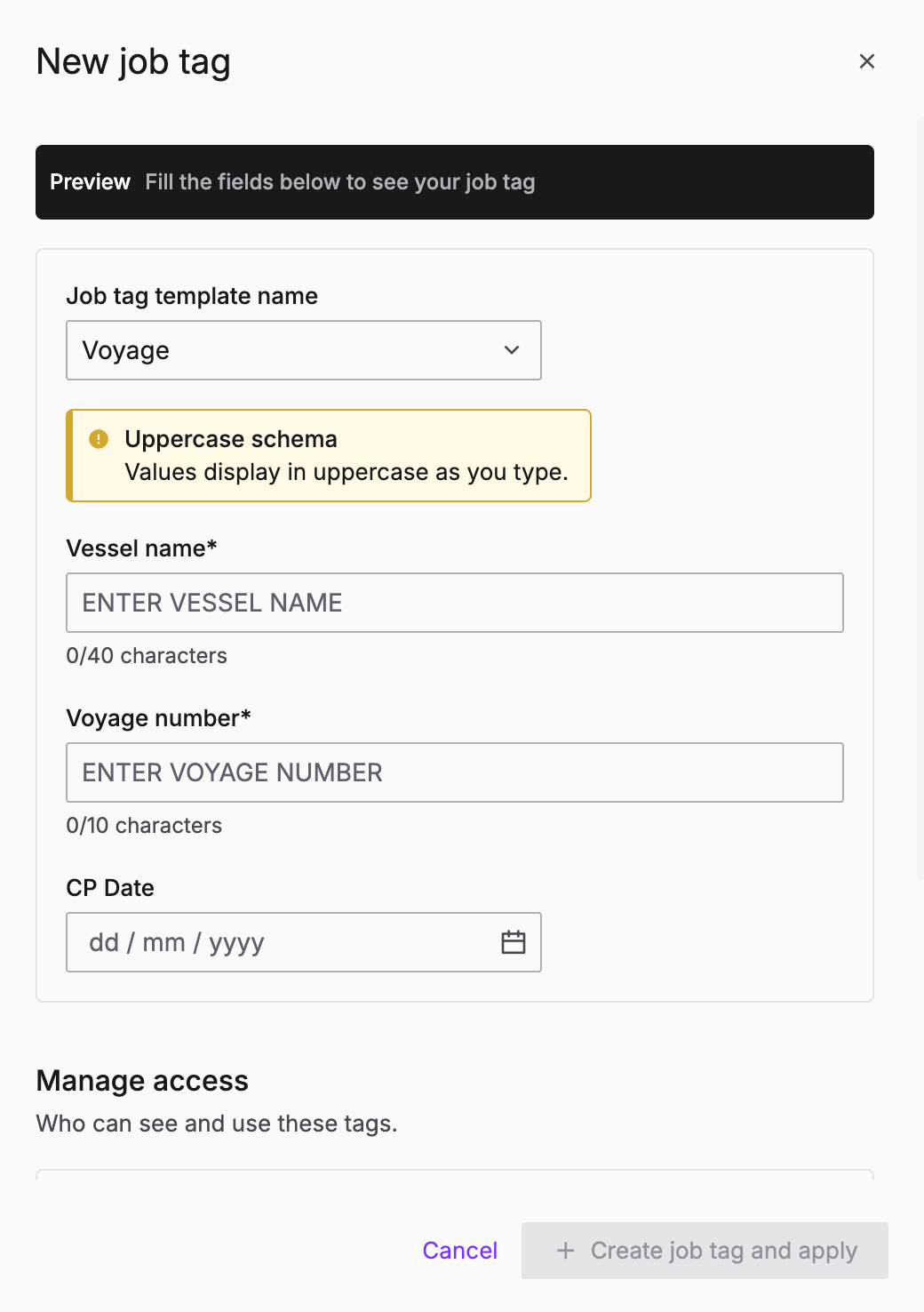
Job tags are another important part of how shipping teams organise their work. Different people need to find the same voyages, vessels, and counterparties, so consistency matters.
Your team can then create, edit, and merge tags from those templates, either in Settings or directly from the tag panel on an email.
The integration is rolling out across accounts in stages. Your Customer Success Manager can let you know when yours is scheduled.
Need to create a tag while reading a message? Just press Shift+J. Because names come from the template, everyone identifies the same voyage in the same way, while existing tags continue to work as they do today. Read about job tags.
And because different teams need access to different information, sharing should be straightforward, too. Saved searches can now be shared with specific people, one or more teams, or both. Build a saved search for a trade lane and share it with the two colleagues who need it, rather than the whole team.
Open Office Files Without Downloading Them
We know that documents are just as much a part of getting the job done as the conversations around them. Word, Excel and PowerPoint files now open in Sedna Email's own viewer, in a separate window, so you can keep the email and its contents side by side.
In Excel, select cells to see the sum, count and average, and copy them straight into a spreadsheet. For quick checks, there's no need to download anything.
Turn it on in Settings > Display. Read more about this here.
AI Assist: Get More From the Documents You Work With
Important information isn't always in your inbox. It might be buried in a charter party, a spreadsheet or a collection of voyage documents. Now you can bring those files straight into an AI Assist conversation and ask questions about them in plain language.
Instead of opening several files and working through them individually, you can now upload them directly into an AI Assist conversation and ask questions in plain language.
Compare a recap against a charter party, pull key terms from a spreadsheet, or summarise up to 20 documents at once. Simply click the paperclip, then paste or drag the files from your computer straight into the chat input to get started.
Sedna Email: Small Changes, Smoother Working Days (Recently launched)
Clean-Up Your Inbox
Tidy gives you more control over your inbox, too. Choose to archive everything except the last 24 or 48 hours, keeping recent messages while clearing older mail.
Automate Your Sent Mail
Workflows now run on the emails you send as well as the ones you receive. Tick the new box in your workflow settings and anything you used to handle by hand after hitting send gets done for you.
Know Where You’re Sending From
Writing emails on mobile is now clearer, too. Sedna shows which mailbox and address your email will go from, whether it’s your own or a shared one, so you never send from the wrong address by mistake.
Sedna Email: Small Changes, Smoother Working Days (Coming Soon)
We know that some of the biggest frustrations aren't necessarily the big things. They're the small, repetitive tasks you do dozens of times a day. A few seconds saved here and there can make a real difference over the course of a busy working day.
Here are some improvements coming to Sedna Email over the next few weeks:
- Send emails with Ctrl+Enter.
- Keep original attachments when replying or replying all.
- Add all attachments from another email in one click.
- Move all recipients between To, Cc and Bcc by dragging the label.
- Copy recipients from an existing email and paste them into a draft as clean email addresses.
- Choose whether to display recipient names or full email addresses.
- Archive Incoming Emails for Everyone
Coming Next: Sedna in Your Pocket
Shipping doesn't stop when you leave your desk, and neither should your ability to stay connected to the work that matters.
That's why we're working on a new Sedna mobile app, designed to give you more flexibility wherever the working day takes you.
With offline access, you'll be able to read, filter, and draft emails even when you’re not connected to the internet. Your drafts will sync automatically when you're back online. You'll also be able to use AI Assist from your phone, asking questions and adding files to conversations for extra context.
Whether you're checking an update between meetings, keeping up with a voyage, or catching up while away from your desk, Sedna will help you stay close to the information you need.
More details coming soon.
Less Chasing. More Time for the Work that Matters
We know shipping. We understand that every voyage brings its own challenges, that commercial decisions depend on having the right information, and that people need technology that works with the way they do business.
That's what sits behind these updates: practical improvements shaped around the realities of working in shipping. We're here to bring people, information, and tools closer together, so you can spend less time managing the work and more time moving the businesses forward.
Sedna Customer Success: Here for You
As always, we're here to help you get the most from Sedna. If you'd like to know more about this month's product updates or explore what might work best for your team, speak to our Customer Success team.